Your agent found the answer. Now give it a chart.
Claude or Codex analyzes your data with the Trifle skill, builds a local SQLite metrics database with the CLI, and you upload that file to Trifle App when humans want to see it.
How the workflow goes
Agents are great at analysis and terrible at showing their work. This fixes the second part.
Agent learns Trifle
Install the open source Agent Skills with npx -y @trifle-io/install. Claude Code, Codex, Cursor, and friends pick up best practices for metric payloads, key design, and CLI analytics workflows. No prompt engineering on your side.
Agent builds metrics locally
You ask a question about your data. The agent runs Trifle CLI with the zero-config SQLite driver, aggregates datasets far too big for its context window into ./trifle.db, and queries the rollups instead of re-reading raw data.
Humans get dashboards
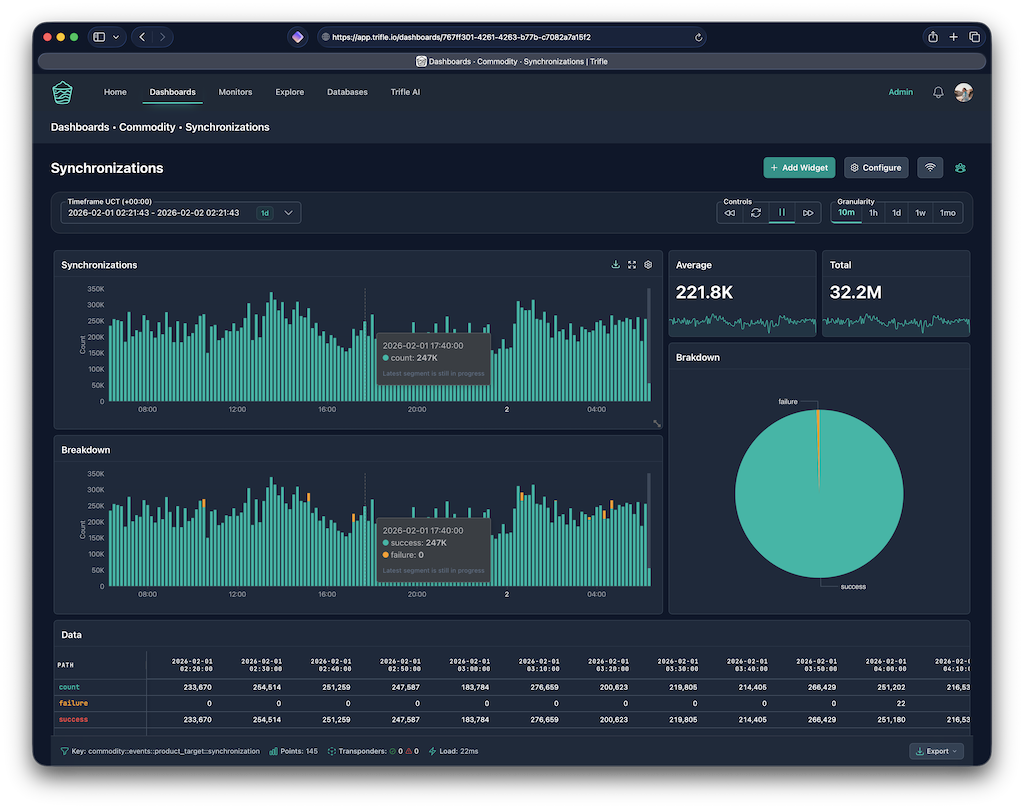
When the analysis is worth keeping, you upload the SQLite file straight into Trifle App. It becomes a source like any other database, and the dashboards, alerts, and digests build on top of it. A link you can send to someone who was never going to read the agent transcript.
Local first, no server needed
Run any Trifle command and the CLI creates a local SQLite database. No config files, no environment variables.
This is the piece that makes agents good at analytics: a scratch database they can fill with aggregates and query cheaply. Instead of holding a hundred thousand rows in context, the agent tracks them into time buckets once and asks small questions after.
The metric shape is the same as everywhere else in Trifle: keys, timestamps, nested values, granularity buckets. Which means nothing about the data is throwaway. What starts as agent scratch space is already in the format dashboards understand.
Three ways to connect, same commands: fully offline with local SQLite, directly to your database, or through Trifle App.
# agent aggregates a big export into local buckets
$ trifle metrics push --driver sqlite --db ./trifle.db \
    --key 'orders::analyzed' --values '{"count":1,"flagged":1}'

# then asks small questions instead of re-reading rows
$ trifle metrics get --driver sqlite --db ./trifle.db \
    --key 'orders::analyzed' --granularity 1d

# and when a human wants to see it:
# upload ./trifle.db to Trifle App as a source
MCP server mode
For agents that prefer tools over shell commands, the CLI speaks MCP.
{
  "mcpServers": {
    "trifle": {
      "command": "trifle",
      "args": ["mcp"]
    }
  }
}| Tool | What the agent does with it |
|---|---|
| list_metrics | Discover which keys exist before asking questions |
| fetch_series | Pull a timeframe of buckets at any granularity |
| aggregate_series | Sum, mean, min, max over any dot-path |
| format_timeline | Chart-ready timestamped pairs |
| write_metric | Track new values from the conversation |
Run trifle mcp and any MCP client can query your metrics while having full context of your code. Claude Desktop, Cursor, Cline, Continue. Same config shape everywhere.
The useful part is the combination: an agent that is reading your codebase and can also ask "what were yesterday's error rates by category" gets to correlate the two. That is the kind of question that used to need a human with two dashboards open.
MCP mode works against local SQLite too, so the whole loop runs on a laptop with zero infrastructure.
The ending: upload the file, get the visual layer
The agent's scratch database is a first-class citizen in Trifle App.
This is the part that closes the loop. That ./trifle.db the agent built is not a dead end. Upload it into Trifle App and it becomes a source, same as a connected Postgres or MongoDB. Explore the keys, drag widgets onto a dashboard, schedule a digest, put an alert on a path.
The analysis stops living in a terminal transcript and starts living where the rest of the team already looks. And because the agent modeled the data as proper time buckets from the start, there is nothing to convert. The file is the report.
Agent does the analysis. You do the show and tell. Trifle carries the data between the two.
Keep reading
Skills, MCP setup, and the CLI itself.